How to Ship a Laptop Safely: Boxes, Packaging and Cost


To ship a laptop safely, shut it down, protect the screen and casing, stop the device from moving, use a properly sized corrugated box, and check the current battery rules for your route. The final package should be tight enough to control movement, but not so large that extra void space turns into damage risk and dimensional-weight cost.
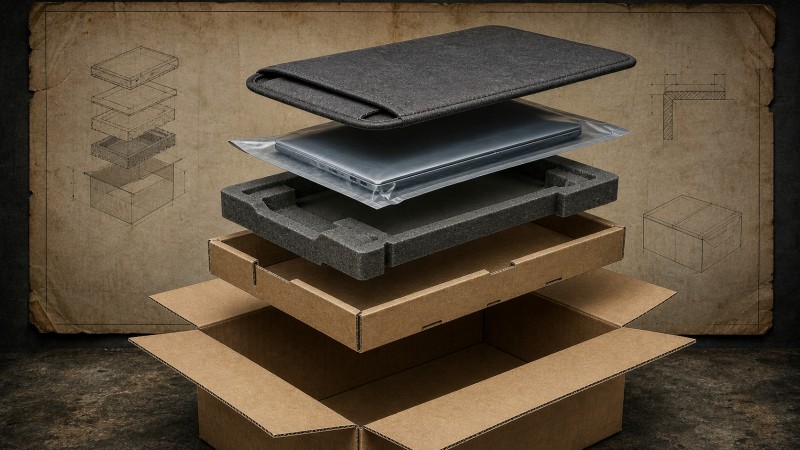
What materials do you need to ship a laptop?
For a one-off shipment, gather the materials before packing. Stopping halfway through the job usually leads to a box that is too large, too much loose filler, or accessories pressed against the laptop.
- A strong inner or outer corrugated shipping box in good condition;
- A fitted foam, molded, or paperboard insert to hold the laptop in position;
- A soft sheet or sleeve to protect the screen and finished surfaces;
- Static-control packaging where the device or project requires it;
- Separate wrapping for the charger, cable and other accessories;
- Strong packing tape, a clear address label and any required battery marking.
Bubble wrap can absorb some impact, but it is not a substitute for movement control. A laptop that slides inside a large box can still hit the carton wall even when the box looks full. Loose paper has the same weakness: it fills volume, but it does not always hold the device at a known position.
How to ship a laptop without the original box
The original retail box is useful when it is clean, dry and undamaged, but it may have been designed for palletized distribution rather than a single parcel. For an older device without its original packaging, use a fitted inner protection layer and a sturdy outer carton. For a valuable laptop or a long route, a double-box arrangement adds a second buffer around the inner pack.
Do not select the shipping box from the laptop’s screen size alone. Allow for the closed device, the insert, surface protection and accessories, then check the final external dimensions. A custom mailer box can make sense when a business ships the same model repeatedly and wants the fit and packing sequence to stay consistent.
Step-by-step: how to pack a laptop for shipping
1. Back up data and shut the device down
Back up important files before packing a used laptop. Sign out of accounts where appropriate, remove external drives and shut the device down completely. Do not attempt to remove an internal battery simply for shipping; check the carrier and destination requirements instead.
2. Protect the screen and exterior
Place a thin, soft layer between the keyboard and screen if the device design allows it without creating pressure. Wrap the closed laptop in a sleeve or protective sheet. The layer should prevent scuffing and abrasion without forcing the lid or corners outward.
3. Add static and moisture protection when needed
A normal plastic bag is not automatically an anti-static bag. For sensitive electronics or a defined packaging specification, use the appropriate static-control material and keep it close to the device. Make sure the laptop is dry before sealing it inside any protective layer.
4. Pack the accessories separately
Wrap the power adapter and cable so they cannot rub against the laptop or concentrate pressure on the screen. Use a divider, side pocket or separate compartment where possible. Accessories should not be allowed to move freely around the device during handling.
5. Position the laptop in the insert
Set the laptop into the fitted foam, molded pulp or corrugated insert. The insert should support the edges and corners while leaving vulnerable surfaces away from the carton wall. If the device can move vertically or sideways, the insert is not doing enough yet.
6. Control the remaining space
Fill small gaps with a material that stays in place. Avoid creating hard pressure points on the lid, display or ports. If the gap is large, changing the box or insert is usually better than adding more loose filler.
7. Close, shake and inspect
Close the box without forcing the flaps. Give it a gentle movement check. You should not hear the laptop or accessories sliding inside. Open the box again if you feel movement; a quick check at the packing bench is cheaper than a damage claim after delivery.
8. Seal and label the carton
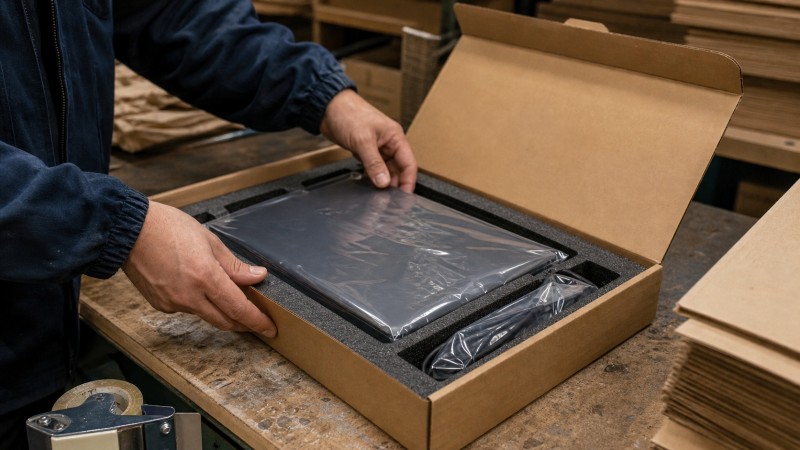
Seal the main seams with a suitable packing tape pattern and place labels on a flat surface, not across a fold or seam. Record the serial number and shipment value for your own file. For high-value shipments, tracking, signature service and declared value may be worth the extra cost.
This sequence follows the practical principles set out in UPS guidance for shipping laptops: choose the box carefully, prevent movement, protect the device from accidental activation, and confirm the rules that apply to air or cross-border transport.
What is the best laptop shipping box?
There is no single best box for every shipment. The right choice depends on the laptop’s weight, dimensions, weak points, route, handling environment and whether the package will be used once or hundreds of times.
| Packaging option | Works well for | Watch-outs |
|---|---|---|
| Original retail packaging | New devices or occasional shipments | May need an outer shipping carton for parcel handling |
| Standard corrugated box | One-off shipping when suitable inserts are available | Manual filling can create inconsistent fit |
| Double-box system | High-value devices and longer routes | More material, cube and handling time |
| Custom box with insert | Repeat shipments, repairs and fulfillment programs | Requires sampling and an agreed specification |
For business shipments, protective electronics packaging should be designed around the device’s weak points. Foam may provide close cushioning for a valuable laptop, while corrugated inserts can be lighter, easier to recycle and practical for repeat packing. The better question is not “foam or cardboard?” but “which structure controls movement, impact, compression and packing labor for this route?”
Suppliers should review the complete packout: laptop, sleeve, insert, charger compartment, inner box, outer box, tape and carton marks. The electronics packaging application guide is useful for framing that conversation around product sensitivity, insert fit, packing method, quantity and destination rather than around a box name alone.
How much does it cost to mail a laptop?
The exact price changes with the carrier and route, so an old dollar figure is not a reliable quotation. In practical terms, laptop shipping cost is driven by the greater of actual weight and dimensional weight, plus distance, service speed, carrier, declared value, signature service, fuel or remote-area surcharges and any customs work.
Before checking a rate, measure the finished package—not just the laptop. A large carton with loose filler may weigh little but still occupy enough space to raise the chargeable weight. A right-sized shipping box can reduce cube, packing material and labor at the same time, provided the protection level is not reduced.
For a simple estimate, prepare four pieces of information: packed weight, external length-width-height, origin and destination postal codes, and the required delivery date. Then compare ground or economy service with express service. If you are preparing a repeat program, record the actual damage rate, packing time and average freight cost; the cheapest box on paper may not be the cheapest package per successful delivery.
When dimension changes are part of the project, confirm whether the supplier is using internal dimensions for product fit and external dimensions for freight planning. The practical box dimension guide explains why a small measurement mistake can affect the fit, quotation, pallet plan and shipping charge.

Can you ship a laptop with a lithium-ion battery?
Often, yes—but the answer depends on the battery type, watt-hour rating, condition, packaging, transport mode, carrier and destination. A laptop with its battery installed is not the same shipping situation as a loose spare battery. Damaged, swollen or defective batteries should not be sent through an ordinary parcel route.
Battery packaging must prevent short circuits, movement and accidental activation. International mail can impose additional limits. For current U.S. requirements and scenario-specific guidance, check the PHMSA lithium battery guide and the carrier’s own instructions before tendering the parcel.
If the shipment is entering international mail, also review the USPS lithium-battery notice for the conditions that apply to batteries installed in small consumer equipment. Do not rely on a generic “fragile” sticker as a substitute for the required marking or documentation.
When should a business use custom protective electronics packaging?
One laptop can usually be packed with carefully selected stock materials. A repair center, refurbisher, IT department or electronics brand has a different problem: every operator needs to pack the same device in nearly the same way, with less movement, less wasted space and fewer decisions at the bench.
Custom packaging becomes more attractive when you ship repeated models, handle returns, need separate accessory compartments, want a branded opening experience, or are paying too much for void fill and dimensional weight. It can also support a returnable workflow in which the same box protects the device on the outbound and return journeys.
Before ordering, give the supplier the laptop dimensions and weight, fragile points, accessory list, target quantity, destination markets, preferred materials, artwork status, packing method and deadline. Ask for a physical sample or prototype that contains the actual laptop. A screen rendering can show the idea; only the filled sample can confirm fit, closure, pressure points and packing speed.
How to choose a protective electronics packaging supplier
Look for more than a catalog photo. A capable supplier should be able to discuss box structure, insert material, sample approval, printing, inspection, carton packing and export coordination as one project. Ask how revisions are recorded, which dimensions are being quoted, how the sample is approved and what information will remain fixed for repeat orders.
For a first inquiry, send the device dimensions, weight, photos of vulnerable surfaces, accessory list, expected shipment volume, route, artwork and deadline. The useful output is not merely a unit price. It is a clear packaging specification that explains what protects the device, what affects freight, and what will be checked before production.
FAQs about shipping a laptop
What is the cheapest way to ship a laptop?
Economy or ground service is often less expensive than express, but the final rate depends on the packed dimensions, weight, route and carrier. Compare rates only after the laptop is packed in its actual shipping box.
Can I ship a laptop without its original box?
Yes. Use a sturdy corrugated carton, a fitted insert or controlled cushioning, surface protection and a separate place for accessories. For high-value devices, consider a double-box system.
How much padding does a laptop need?
There is no universal thickness. The protection should hold the laptop away from the carton wall, support vulnerable edges and prevent movement without putting pressure on the display. Test the filled package rather than choosing padding by appearance.
Do I need an anti-static bag to ship a laptop?
Use static-control packaging when the device, customer specification or transport risk calls for it. A clear plastic bag may protect against dust or moisture, but it should not automatically be described as an anti-static solution.
Can laptop packaging be designed for returns?
Yes. A returnable design can use a durable outer carton, a reversible closure or clear pack-out instructions so the same protection works on the outbound and return journeys. Confirm the opening, repacking and storage steps in a physical sample.
Conclusion: protect the laptop without shipping empty space
Safe laptop shipping comes down to controlled movement, sensible layers and a box sized around the finished pack. For one shipment, careful preparation and a sturdy carton may be enough. For repeated electronics shipping, a tested box-and-insert system can improve consistency, packing speed and total delivery cost.
Plan a laptop shipping box around the real shipment
Forests Packaging Group can review product dimensions, inserts, carton structure, artwork, quantity, destination and packing method through a factory-backed packaging workflow. The aim is to make the approved sample practical for production and repeat shipping.
Send the laptop size and weight, accessory list, current packaging, target volume and delivery route to start a project-specific review.
Send Your Packaging Brief to Our Team
Share your product type, format, size, quantity, material, destination, and required date. Our team can support artwork review, sampling, production, inspection, and export coordination.
Contact us for a project-specific recommendation.



Ready to build packaging with a factory team?
Send your product size, material, artwork, quantity, destination, and deadline so our team can focus the first review on quotation and sampling.